> For the complete documentation index, see [llms.txt](https://docs.watzap.id/help/llms.txt). Markdown versions of documentation pages are available by appending `.md` to page URLs; this page is available as [Markdown](https://docs.watzap.id/help/integrations/integrasi-dengan-n8n/cara-integrasi-watzap-dengan-n8n.md).
# Cara Integrasi WatZap dengan n8n
**WatZap x n8n** adalah solusi integrasi otomatisasi yang menghubungkan platform WhatsApp (melalui WatZap) dengan n8n, sebuah open-source workflow automation tool.
Dengan kombinasi ini, bisnis bisa membuat alur kerja otomatis yang fleksibel, tanpa perlu coding yang rumit.
Selain itu, melalui fitur WatZap x n8n, WhatsApp Kamu bisa menjadi pusat aktivitas bisnis, mulai dari penerimaan order, follow-up, notifikasi, hingga laporan harian semuanya berjalan otomatis. Untuk memulai integrasi WatZap dengan n8n, Kamu perlu menambahkan node WatZap pada n8n.
**Node WatZap** adalah sebuah ekstensi khusus di n8n yang berfungsi sebagai penghubung antara WhatsApp (melalui WatZap) dengan berbagai aplikasi atau layanan lain yang ingin diotomatisasi.
Sebelum install node WatZap, pastikan n8n sudah terpasang dengan benar di server Kamu. Ada beberapa cara install node WatZap yang bisa Kamu pilih, seperti melalui **Community Nodes**, **docker**, dan **server lokal.**
Jika n8n sudah terpasang, cara menambahkan atau meng-install node WatZap di n8n seperti berikut:
Pertama, kunjungi website npmjs [**n8n-nodes-watzap**](https://www.npmjs.com/package/n8n-nodes-watzap)**.**
Jika ingin install melalui di n8n, Kamu bisa kunjungi menu Settings terlebih dahulu dengan klik icon titik 3 yang ada di bagian profile bawah kiri ini.
Lalu pilih **Settings**.
Selanjutnya, kunjungi menu **Community Nodes.**
Klik tombol **Install a community node**.
Kemudian, masukkan "**n8n-nodes-watzap"** ke dalam kolom, ceklis persetujuannya, dan klik tombol **Install**.
Tunggu proses install-nya sampai selesai. Jika proses instalasi berhasil, maka akan muncul tampilan WatZap node seperti ini.
Dengan begitu, maka node WatZap sudah berhasil selesai di install.
Langkah selanjutnya adalah melakukan setup API Key, Number Key, dan koneksi awal.
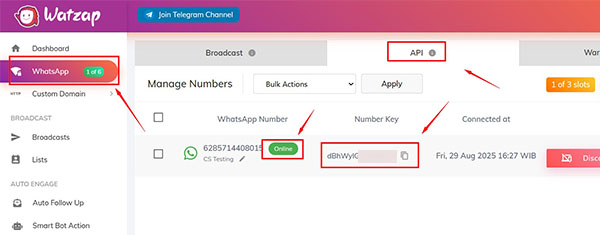
Sebelum setup, [**koneksikan nomor**](/help/integrations/menambahkan-nomor-wa-untuk-api.md) Kamu di menu **WhatsApp** -> **API**. Pastikan statusnya **Online** supaya bisa mendapatkan **Number Key**.
Kemudian, kunjungi menu **n8n** dan copy **API Key** nya.
Selanjutnya, buka **workflow n8n** Kamu. Gunakan node **WatZap Triggers** yang berfungsi sebagai pemicu (trigger) dalam sebuah workflow di n8n.
Artinya, setiap kali ada aktivitas tertentu yang terjadi di WhatsApp melalui WatZap, node ini akan mengaktifkan workflow secara otomatis tanpa perlu intervensi manual.
Gunakan **node WatZap Triggers** seperti ini.
Setelah itu, klik 2x node WatZap Triggers nya. Klik dropdown **Credential to connect with**, lalu pilih **+Create new credential**.
Kemudian paste atau masukkan **API Key** nya dan klik tombol **Save**.
Maka akan muncul notifikasi berhasil seperti ini.
Selesai. Kamu sudah berhasil integrasikan WatZap dengan n8n.