> For the complete documentation index, see [llms.txt](https://docs.watzap.id/help/llms.txt). Markdown versions of documentation pages are available by appending `.md` to page URLs; this page is available as [Markdown](https://docs.watzap.id/help/integrations/integrasi-dengan-n8n/cara-membuat-chatbot-ai-di-n8n-dengan-google-form.md).
# Cara Membuat Chatbot AI di n8n dengan Google Form
Membuat Chatbot AI kini semakin mudah berkat integrasi dengan n8n, Google Form, dan OpenAI. Sebelum membuat Chatbot AI, pastikan Kamu sudah [**setting Webhook URLs**](/help/integrations/integrasi-dengan-n8n/cara-mendapatkan-webhook-url-untuk-n8n.md) dan [**integrasi dengan WatZap di n8n**](/help/integrations/integrasi-dengan-n8n/cara-integrasi-watzap-dengan-n8n.md). Untuk cara membuat Chatbot AI nya seperti berikut.
Pertama dimulai dengan menyiapkan Google Form sebagai knowledge atau sumber informasi seputar produk atau layanan Kamu.
Kemudian masuk ke dalam n8n dan tambahkan **node WatZap Triggers** dengan settingan seperti ini. Sesuaikan Number Key nya dengan nomor whatsapp yang terhubung di akun WatZap Kamu.
Selanjutnya gunakan **node IF** dengan settingan seperti ini. Node ini berguna untuk meminimalisir pesan Chatbot AI terkirim double.
Langkah selanjutnya gunakan **node AI Agent** dengan settingan seperti ini.
Lalu gunakan **node OpenAI** atau Gemini sebagai Chat Model.
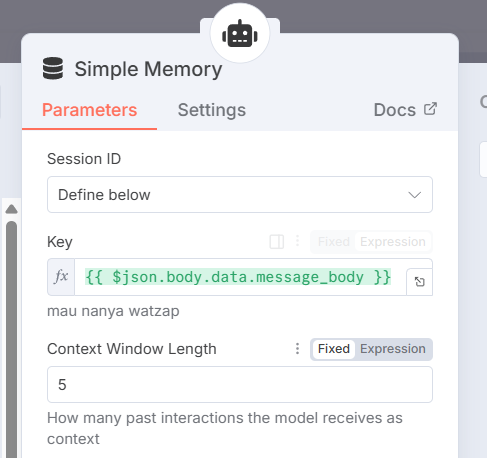
Kemudian gunakan **node Simple Memory**. Sesuaikan jumlah "Context Window Length" dengan kebutuhan Kamu.
Langkah berikutnya gunakan **node Google Docs** dengan settingan seperti ini. Copy & Paste link Google Docs yang isinya seputar informasi produk atau layanan Kamu.
Terakhir gunakan **WatZap Node Actions** dengan settingan seperti ini.
Dengan begitu, worfklow Chatbot AI bisa langsung Kamu dengan klik tombol **Execute Step**.
Lalu chat ke nomor WhatsApp yang terhubung di akun WatZap Kamu menggunakan nomor lain. Jika workflow berhasil dibuat, maka akan muncul jawaban otomatis seperti ini.
Selesai.