# Cara Menggunakan Fitur Variabel WABA Official

Pernah menerima pesan WhatsApp dari brand besar yang menyebut namamu secara otomatis? Itu bukan diketik manual satu per satu, melainkan menggunakan fitur Variabel. Fitur ini memungkinkan kamu mengirim satu template pesan ke ribuan orang, tapi isinya tetap terasa personal. Yuk, simak cara buatnya!

### Apa itu Variabel?

**Variabel adalah** "wadah" teks yang bisa berubah-ubah isinya sesuai data pelanggan kamu. Di sistem Meta, variabel ditandai dengan angka di dalam kurung kurawal ganda, contohnya: **`{{nama}}`, `{{tagihan}}`**, dan seterusnya. Pastikan tidak variabel yang sama di dalam 1 template pesan, karena  ini tidak support dari Meta nya.&#x20;

### Tutorial Membuat Variabel

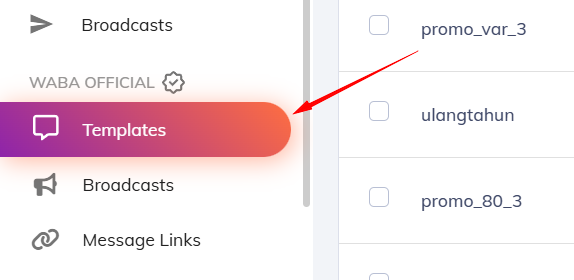
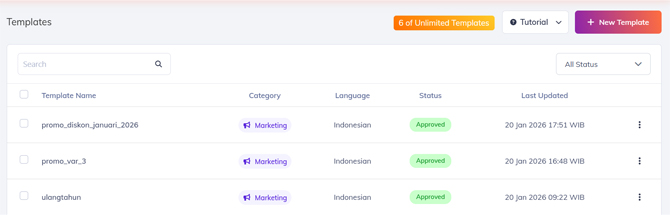
Pertama, buat template terlebih dahulu dengan kunjungi menu **Templates**.

<figure><img src="https://4182233851-files.gitbook.io/~/files/v0/b/gitbook-x-prod.appspot.com/o/spaces%2F5hxDGBLGZN4N69IP4zHp%2Fuploads%2FzH0g1YkVKX6iL5tLQRYU%2Fimage.png?alt=media&#x26;token=2e3e9b74-e07d-42a9-bc97-727030422be5" alt=""><figcaption></figcaption></figure>

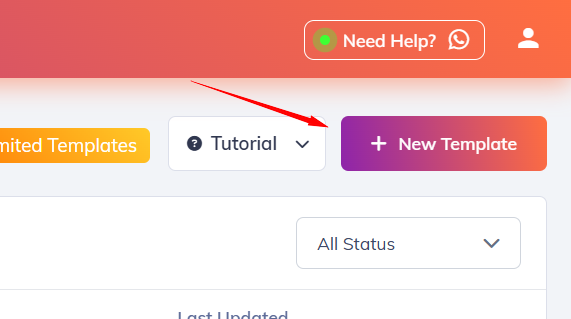
Lalu klik tombol **New Template**.

<figure><img src="https://4182233851-files.gitbook.io/~/files/v0/b/gitbook-x-prod.appspot.com/o/spaces%2F5hxDGBLGZN4N69IP4zHp%2Fuploads%2F8g8rpWj1NLj9maGxTj2b%2Fimage.png?alt=media&#x26;token=4f1919b7-3748-41b9-8aa2-5e6c258cb374" alt=""><figcaption></figcaption></figure>

Kemudian isi **Template Name**, pilih **Category**, dan **Language**.

<figure><img src="https://4182233851-files.gitbook.io/~/files/v0/b/gitbook-x-prod.appspot.com/o/spaces%2F5hxDGBLGZN4N69IP4zHp%2Fuploads%2FXxIcMp037VQzgSeX2s4H%2Fvar%201.jpg?alt=media&#x26;token=5056925d-2426-4952-93ef-ba408472ef31" alt=""><figcaption></figcaption></figure>

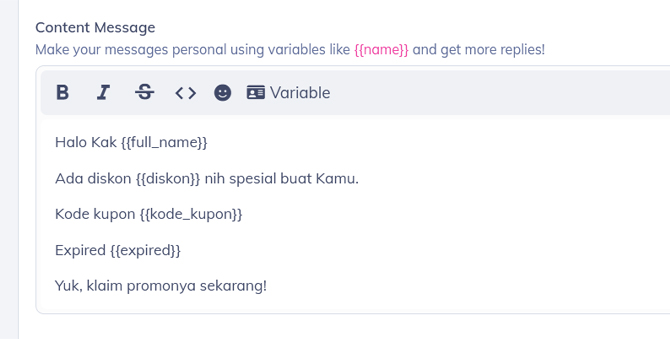
Setelah itu, masukkan **Content Messages** nya. Gunakan **kurung kurawal ganda** untuk mengaktifkan fitur variabel seperti ini. Pastikan **penamaan** variabel-nya **sama dengan** variabel **List** kontak Kamu.

Contohnya, jika di list kontak kamu kolom/variabel nya **full name, diskon,** dan **expired**, masukkan juga dengan nama yang sama seperti ini  **`{{full_name}}` , `{{diskon}}` dan  `{{expired}}`**

<figure><img src="https://4182233851-files.gitbook.io/~/files/v0/b/gitbook-x-prod.appspot.com/o/spaces%2F5hxDGBLGZN4N69IP4zHp%2Fuploads%2FxuDOBUhHU7uajosdZLud%2Fvar%202.jpg?alt=media&#x26;token=0a31eb87-3011-41f2-bd93-02f6ff1515cd" alt=""><figcaption></figcaption></figure>

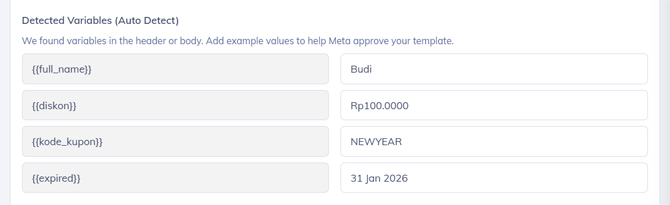
Setelah itu, di bagian bawah Kamu bisa masukkan **sample content** sebagai gambaran saat variabel digunakan untuk broadcast.&#x20;

<figure><img src="https://4182233851-files.gitbook.io/~/files/v0/b/gitbook-x-prod.appspot.com/o/spaces%2F5hxDGBLGZN4N69IP4zHp%2Fuploads%2FdytlGM4E604zQAkLryUu%2Fvar%203.jpg?alt=media&#x26;token=ab53203b-71cd-49d1-962a-2f0f1489d8e5" alt=""><figcaption></figcaption></figure>

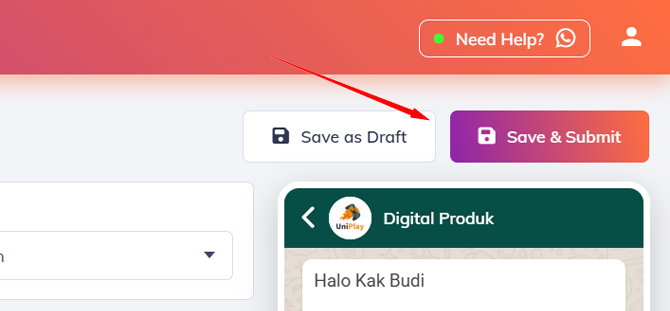
Jika sudah selesai, klik tombol **Save & Submit template** nya.

<figure><img src="https://4182233851-files.gitbook.io/~/files/v0/b/gitbook-x-prod.appspot.com/o/spaces%2F5hxDGBLGZN4N69IP4zHp%2Fuploads%2FCbTBQmTcv7I7jF23pDV4%2Fvar%204.jpg?alt=media&#x26;token=3e73ec31-4e15-42d9-96a6-d5de33e671e8" alt=""><figcaption></figcaption></figure>

Tunggu beberapa saat sampai status template nya **Approved**.

<figure><img src="https://4182233851-files.gitbook.io/~/files/v0/b/gitbook-x-prod.appspot.com/o/spaces%2F5hxDGBLGZN4N69IP4zHp%2Fuploads%2FKNLAo95duZFGAiyIe5K9%2Fvar%205.jpg?alt=media&#x26;token=77ce4821-4403-4e33-bb87-1daaa08bd4ee" alt=""><figcaption></figcaption></figure>

### Tutorial Kirim Broadcast dengan Fitur Variabel

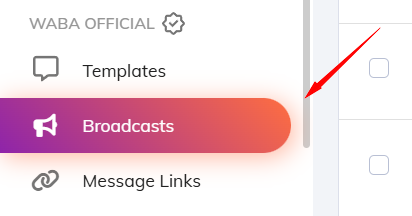
Jika sudah berhasil membuat template, Kamu bisa langsung kunjungi halaman Broadcast.

<figure><img src="https://4182233851-files.gitbook.io/~/files/v0/b/gitbook-x-prod.appspot.com/o/spaces%2F5hxDGBLGZN4N69IP4zHp%2Fuploads%2Fv5EqW5K3duZ9u8Cl7ASG%2Fimage.png?alt=media&#x26;token=4bdbf0b3-3ae3-4543-90dc-90197518afad" alt=""><figcaption></figcaption></figure>

Lalu klik tombol **New Broadcast**.

<figure><img src="https://4182233851-files.gitbook.io/~/files/v0/b/gitbook-x-prod.appspot.com/o/spaces%2F5hxDGBLGZN4N69IP4zHp%2Fuploads%2FQvfBmT91MckeQcySZcR3%2Fvar%206.jpg?alt=media&#x26;token=199e4c6c-522c-4a31-b375-220ed90b669c" alt=""><figcaption></figcaption></figure>

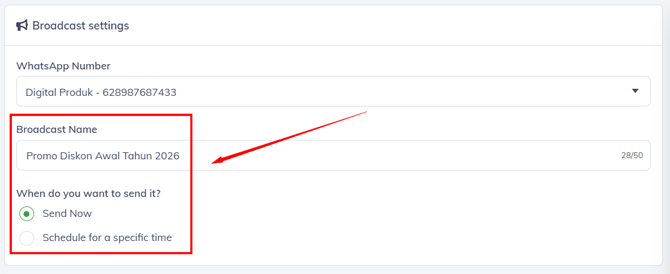
Kemudian isi kolom **Broadcast Name** dan pilih waktu pengirimannya.

<figure><img src="https://4182233851-files.gitbook.io/~/files/v0/b/gitbook-x-prod.appspot.com/o/spaces%2F5hxDGBLGZN4N69IP4zHp%2Fuploads%2FwHCyCXtoUXm0PkMBO5hC%2Fvar%207.jpg?alt=media&#x26;token=f715156b-67b2-4e6d-9c80-982753ca0981" alt=""><figcaption></figcaption></figure>

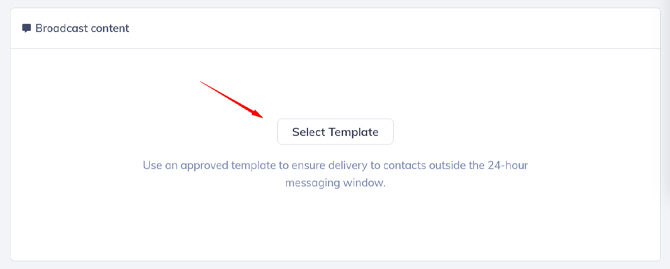
Selanjutnya, pilih template yang sudah dibuat di bagian **Broadcast Content** dengan **Select Template**.

<figure><img src="https://4182233851-files.gitbook.io/~/files/v0/b/gitbook-x-prod.appspot.com/o/spaces%2F5hxDGBLGZN4N69IP4zHp%2Fuploads%2FJvmtkbAaPxs5GTjllJYi%2Fvar%208.jpg?alt=media&#x26;token=bd5409f2-e2d1-417d-9e0b-fae569aa9111" alt=""><figcaption></figcaption></figure>

Lalu scroll ke bawah dan **ceklis list audiens** yang ingin kamu broadcast.

<figure><img src="https://4182233851-files.gitbook.io/~/files/v0/b/gitbook-x-prod.appspot.com/o/spaces%2F5hxDGBLGZN4N69IP4zHp%2Fuploads%2FpWyOidCQEFLtY2rgvLO7%2Fvar%209.jpg?alt=media&#x26;token=b1d3ba86-9b48-4ca5-8249-d6e8fd7087b4" alt=""><figcaption></figcaption></figure>

Berikutnya, pada **Detected Variabels**, mapping atau sesuaikan secara manual antara variabel template dengan variabel list kontak Kamu seperti ini. Pastikan sesuai dan tidak ada yang berbeda.

<figure><img src="https://4182233851-files.gitbook.io/~/files/v0/b/gitbook-x-prod.appspot.com/o/spaces%2F5hxDGBLGZN4N69IP4zHp%2Fuploads%2Fujxf1ZYdz9DguXz00HyB%2Fvar%2010.jpg?alt=media&#x26;token=b166811e-7843-42b1-b481-143af488f7aa" alt=""><figcaption></figcaption></figure>

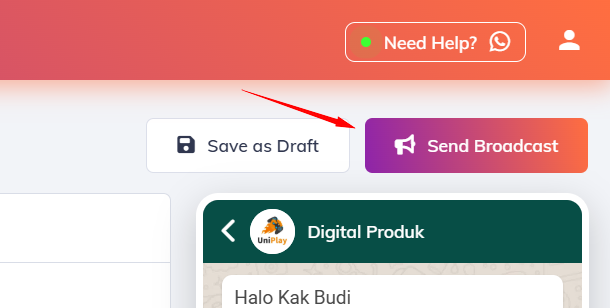
Jika sudah, kirim broadcast klik tombol **Send Broadcast**.

<figure><img src="https://4182233851-files.gitbook.io/~/files/v0/b/gitbook-x-prod.appspot.com/o/spaces%2F5hxDGBLGZN4N69IP4zHp%2Fuploads%2Fb5inFO6ZCymH2AY7TE42%2Fimage.png?alt=media&#x26;token=e14b279c-2486-43ea-94b4-075801c5d794" alt=""><figcaption></figcaption></figure>

Selesai.